hi Developers ,
in that post, i am describing the difference between shallow and deep copy by the use of C# language.
shallow and deep copy are used for copying data between objects.
Shallow Copy:
creating a new object, and then copying the nonstatic fields of the current object to the new object.
If a field is a value type --> a bit-by-bit copy of the field is performed
If a field is a reference type --> the reference is copied but the referred object is not; therefore, the original object and its clone refer to the same object.
in C# and VB.NET, shallow copy is done by the object method MemberwiseClone()
Example:
the following are clsShallow class to be cloned which include value types (like Age) and ref types (like EmpSalary is a class)
public class clsShallow
{
    public static string CompanyName = "My Company";
    public int Age;
    public string EmployeeName;
    public clsRefSalary EmpSalary;

    public clsShallow CreateShallowCopy(clsShallow inputcls)
    {
        return (clsShallow)inputcls.MemberwiseClone();
    }
}
public class clsRefSalary
{
    public clsRefSalary(int _salary)
    {
        Salary = _salary;
    }
    public int Salary;
}
now, let us debug and trace the outputs to do the shallow copy by the use of CreateShallowCopy() method
first, use the following code to call the CreateShallowCopy method from other classes
// Creates an instance of clsShallow and assign values to its fields.
clsShallow objshallow = new clsShallow();
objshallow.Age = 25;
objshallow.EmployeeName = "Ahmed Eid";

// add the ref value to the objshallow
clsRefSalary clsref = new clsRefSalary(1000);
objshallow.EmpSalary = clsref;

// Performs a shallow copy of m1 and assign it to m2.
clsShallow m2 = objshallow.CreateShallowCopy(objshallow);

// then modify the clsref salary value to be 2000
clsref.Salary = 2000;

// so the m1 object salary value become 2000
int EmpSalary = objshallow.EmpSalary.Salary;
After assigning the values (value and ref types ones) to the object objShallow and before doing the shallow copy
the values are : (for the current object value)
Age : 25 (value type)
EmpSalry: has salary value of 1000 (ref type)
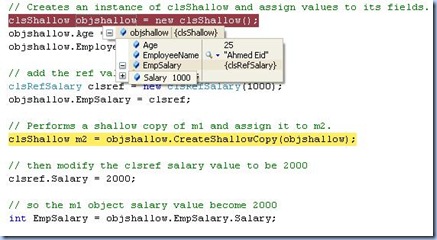
then do the shallow copy and modify the value of clsref.salary ,reference field type, then check the values of m2 , new created object. (ref and value fields) again
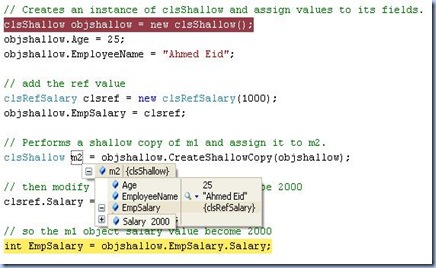
the values are : (for the new created object)
Age : 25 (value type) a new copy of the objShallow object
EmpSalry: has salary value of 2000 (ref type) a refernce to objShallow.EmpSalry object, which is also referenced to the clsref object.
Note: values of m2.EmpSalry and clsref are the same after modifying the clsref values. (reference type concept)
Deep Copy:
creating a new object, and then copying the nonstatic fields of the current object to the new object.
If a field is a value type --> a bit-by-bit copy of the field is performed
If a field is a reference type --> a new copy of the referred object is performed.
Note: the classes to be cloned must be flagged as [Serializable]
Example:
the following are clsDeep class to be cloned which include value types (like Age) and ref types (like EmpSalary is a class)
[Serializable]
// serialize the classes in case of deep copy
public class clsDeep
{
    public static string CompanyName = "My Company";
    public int Age;
    public string EmployeeName;
    public clsRefSalary EmpSalary;
    public clsDeep CreateDeepCopy(clsDeep inputcls)
    {
        MemoryStream m = new MemoryStream();
        BinaryFormatter b = new BinaryFormatter();
        b.Serialize(m, inputcls);
        m.Position = 0;
        return (clsDeep)b.Deserialize(m);
    }
}

[Serializable]
public class clsRefSalary
{
    public clsRefSalary(int _salary)
    {
        Salary = _salary;
    }
    public int Salary;
}
now, let us debug and trace the outputs to do the deep copy by the use of CreateDeepCopy() method
first, use the following code to call the CreateDeepCopy method from other classes
// Creates an instance of clsDeep and assign values to its fields.
clsDeep objdeep = new clsDeep();
objdeep.Age = 25;
objdeep.EmployeeName = "Ahmed Eid";

// add the ref value
clsRefSalary clsref = new clsRefSalary(1000);
objdeep.EmpSalary = clsref;

// Performs a shallow copy of m1 and assign it to m2.
clsDeep m2 = objdeep.CreateDeepCopy(objdeep);

// then modify the clsref salary value to be 2000
clsref.Salary = 2000;

// so the m1 object salary value become 2000
int EmpSalary = objdeep.EmpSalary.Salary;
After assigning the values (value and ref types ones) to the object objDeep and before doing the deep copy
the values are : (for the current object value)
Age : 25 (value type)
EmpSalry: has salary value of 1000 (ref type)
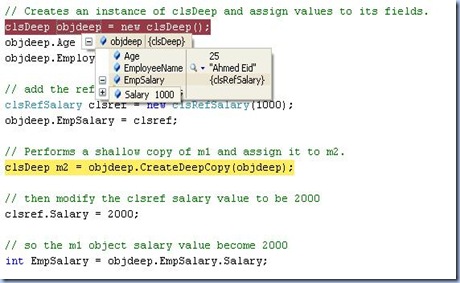
then do the deep copy and modify the value of clsref.salary ,reference field type, then check the values of m2 , new created object. (ref and value fields) again
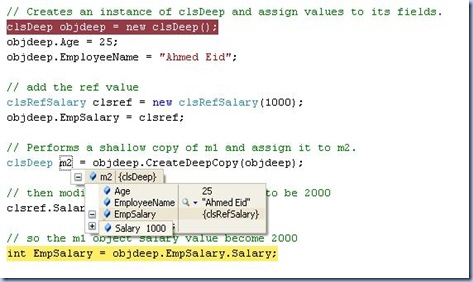
the values are : (for the new created object)
Age : 25 (value type) a new copy of the objDeep object
EmpSalry: has salary value of 1000, a new copy of the objDeep object
Note: values of m2.EmpSalry and objDeep.EmpSalary are not the same as deep copy creates a new object of the reference type (objDeep.EmpSalary) in m2.EmpSalry. but clsref and objDeep.EmpSalary are the same (Refernce type concept)
With the help of Google I found a very smart method for performing deep copy. Its performance is good than the one i used on that post.
/// <summary>
/// Using generics will solve some performance issues
/// </summary>
/// <typeparam name="T"></typeparam>
/// <param name="item"></param>
/// <returns></returns>
public static T DeepCopy<T>(T item)
{
    BinaryFormatter formatter = new BinaryFormatter();
    MemoryStream stream = new MemoryStream();
    formatter.Serialize(stream, item);
    stream.Seek(0, SeekOrigin.Begin);
    T result = (T)formatter.Deserialize(stream);
    stream.Close();
    return result;
}
i hope that post help you to deeply understand the difference b/w shallw and deep copy in .NET
Ahmed Eid


